ShareFile QuickEdit for Good6.64.1
Publisher Description
IMPORTANT NOTE: The ShareFile QuickEdit for Good application WILL NOT operate without the necessary back-end software and for IT security reasons each end user of the application must enter their corporate email address and an IT-provided, 15-character Authentication Passcode as part of the initial application setup process. This ensures that only authenticated end users can access the organization resources and use them in accordance with their IT department s specific policies.
ShareFile QuickEdit for Good is the simplest document-editing tool available for iOS devices. Easily view, create, edit and share Microsoft Word, Excel and PowerPoint files right from your iPad , iPhone or iPod !
ShareFile QuickEdit for Good can open and save a wide variety of file formats, including DOC, DOCX, XLS, XLSX, PPT, PPTX, PDF, TXT and others, and even supports tracked changes.
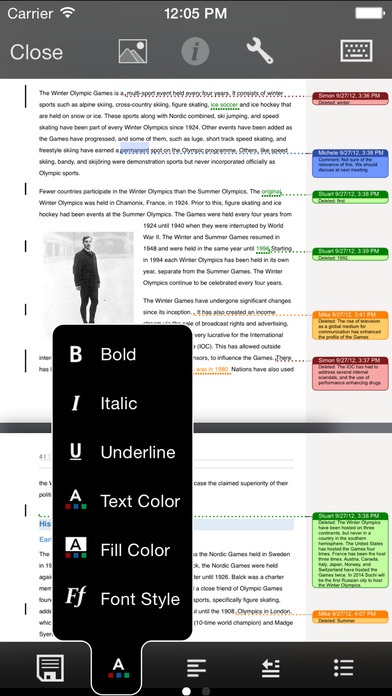
Quickly build and edit full scale word documents
Copy and paste text and images from other apps
Protect your work with automatic saving
Collaborate with others by tracking changes
Save files to PDF or print a hardcopy
Spell check, auto-correction and auto-completion
Advanced features such as footnotes, endnotes and comments
Paragraph formatting including alignment, line spacing, margins, indenting, bullets and numbering
Support for tables, including table creation
Support for floating and inline images
Support for shapes and floating text boxes
Supports section breaks, page breaks and column breaks
View headers and footers
Searching of text within documents
Seamlessly manage spreadsheets containing 140+ functions
Manage and link data across multiple worksheets
Collaborate with others by email attachments or by sharing through free cloud storage
Save files to PDF or print a hardcopy
Color, sort, merge and search cells to build professional presentations for home or office
Cell formatting: bold, italic, borders, text and cell color, alignment and text wrapping
Cell types: general, number, currency, percentage, date, time and text
Pane freezing
Tap and drag to change row heights and column widths
Intelligent auto range selection for range-based functions
Tap cells to compose formulas
Insert, copy, paste or cut cell ranges, rows or columns
Date formats, date separators and numeric separators are all handled correctly according to the current locale, with manual override
Design expert presentations with ease
Insert images and common shapes
Comprehensive text and paragraph formatting: font size and face, text color and highlight, paragraph alignment and line spacing
Save files to PDF or print a hardcopy
Collaborate with others by email attachments and sharing through cloud storage
Rotation of text and shapes
Slide show mode with simulated laser pointer
Slide show presentation on external monitor
EXTRAS
File versioning; revert to any of the last 10 file versions
Save documents, spreadsheets and presentations in PDF format
Wireless printing
Requires iOS 8.0 or later. Compatible with iPhone, iPad, and iPod touch.
About ShareFile QuickEdit for Good
The company that develops ShareFile QuickEdit for Good is Byte Squared. The latest version released by its developer is 6.64.1. This app was rated by 1 users of our site and has an average rating of 2.5.
To install ShareFile QuickEdit for Good on your iOS device, just click the green Continue To App button above to start the installation process. The app is listed on our website since 2012-12-07 and was downloaded 64 times. We have already checked if the download link is safe, however for your own protection we recommend that you scan the downloaded app with your antivirus. Your antivirus may detect the ShareFile QuickEdit for Good as malware if the download link is broken.
How to install ShareFile QuickEdit for Good on your iOS device:
- Click on the Continue To App button on our website. This will redirect you to the App Store.
- Once the ShareFile QuickEdit for Good is shown in the iTunes listing of your iOS device, you can start its download and installation. Tap on the GET button to the right of the app to start downloading it.
- If you are not logged-in the iOS appstore app, you'll be prompted for your your Apple ID and/or password.
- After ShareFile QuickEdit for Good is downloaded, you'll see an INSTALL button to the right. Tap on it to start the actual installation of the iOS app.
- Once installation is finished you can tap on the OPEN button to start it. Its icon will also be added to your device home screen.
